- AI Snack Pack
- Posts
- Gucci Ad Concept
Gucci Ad Concept

AI Snack Pack
August 19, 2025

Welcome to the AI Snack Pack
🤖 Today's AI Buffet:
🛠️ Swipe of the Day
✏️ Micro-Lesson
🎩 Tools to Watch
Swipe of the Day
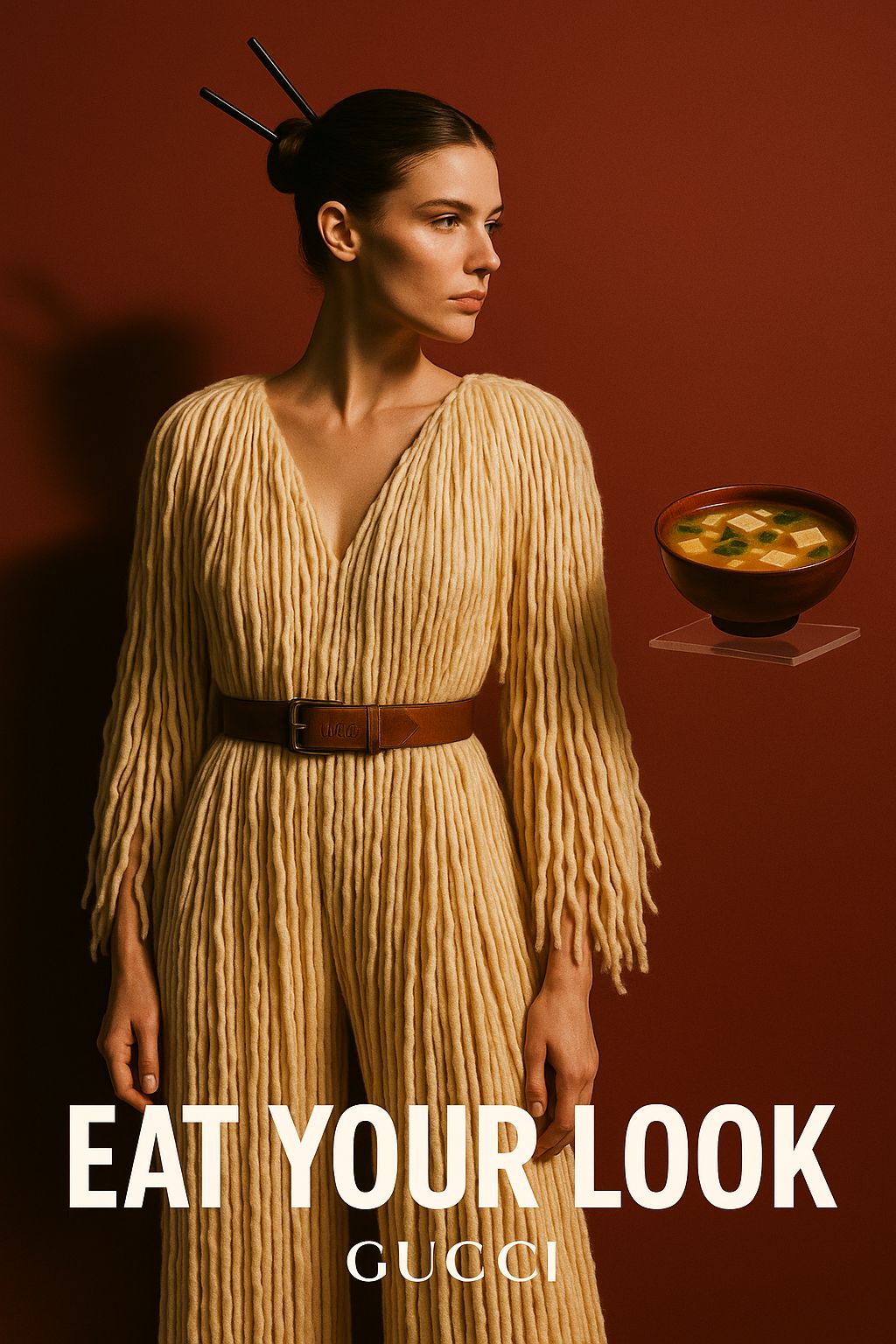
💡 Step 1: The Concept
What if fashion could be savored as much as it’s seen?
…a runway look that doubles as ramen, a gown that drapes like udon.
This ad toys with the blurred line between haute couture and haute cuisine. The model’s outfit echoes strands of noodles, while the bowl of miso soup completes the surreal punchline. The tagline “Eat Your Look” is both daring and playful — transforming luxury fashion into something consumable, absurd, and oddly desirable.
It’s not just a dress. It’s dinner.
🤖 Step 2: The Prompt (ChatGPT)
I asked ChatGPT to turn that idea into ad-concept prompts that fuse fine dining with high fashion. Here’s one example:
“Create a luxury editorial ad where a model poses in a couture outfit made of flowing noodle-like textures, styled in Gucci’s signature minimal elegance. Add subtle food cues — chopsticks in the hair, a bowl of miso soup nearby. Use a bold tagline: ‘Eat Your Look.’ Lighting should be dramatic and warm, highlighting both the textures of the outfit and the glossy bowl, making the boundary between food and fashion intentionally surreal.”Micro-Lesson
Copy Space & Negative Shapes 📝⬜
Goal: Reserve clean, legible areas in your image where real marketing copy or UI text can be placed later.
Why Plan Copy Space?
Design readiness – Ad or cover is print‑ready once copy is added.
Visual balance – Empty zones give the eye a place to rest.
Text clarity – Avoids wrestling with busy backgrounds in post.
Copy‑Friendly Composition Tricks
Technique | Prompt Keywords | When to Use |
|---|---|---|
Blank panel / swatch | “solid white box top‑third” | Magazine covers, posters |
Gradient fade | “smooth left‑to‑right dark‑to‑light gradient” | Banner ads, hero images |
Blurred backdrop | “soft defocused background area” | Product shots with headline overlay |
Framing object | “subject off‑center, negative space right side” | Social posts, sliders |
3‑Step Prompt Recipe
Declare Where & How Much Space
“blank white copy space left third.”Describe Subject Position & Action
“fashion model posed right, walking forward.”Add Style / Lighting for Contrast
“studio high‑key lighting, minimal palette.”
“Minimalist fashion poster, subject: female model in black suit walking, positioned on right third, blank white copy space on left two‑thirds, high‑key studio lighting, negative space clean, no extra graphics”
Micro‑Exercise
Choose a product or character.
Decide on copy placement (top, bottom, left, center).
Write prompt using recipe; generate.
Overlay dummy text in any graphics tool—does it fit comfortably? If not, adjust space size adjectives (“large blank area”).
Troubleshooting
Issue | Fix |
|---|---|
Background too busy behind text | Add “solid colour panel,” “plain gradient.” |
Subject overlaps copy zone | Specify “subject strictly right side.” |
AI adds unwanted text | Negative prompt: “no actual lettering.” |
Next lesson: Add faux or stylised lettering right inside the generation.


🤖 For suggestions, improvements and feedback , please email us at [email protected]
How's this edition working for you? 🎵